Coffee shops, fast food, kiosks: guests order and pay at the counter, then pick up their order when called. Erashma does the calling, with the Erashma till or with yours.
A QR code on the counter
Guests scan the QR code on the counter, the door or a flyer, see your menu with photos and order from their phone. Nothing to install, no account to create.
An order number that starts again at 1 every day
Pay first or pay at pickup: you choose
#42
Ordered at the till? A QR code to follow it
When the cashier types the order (eat in, takeaway or delivery), the till screen shows a QR code. The guest scans it with their phone and follows the order live, from "Sent" to "Preparing" and "Ready".
No app, no account: a page in the browser
"Notify me": a notification arrives when it's ready, even with the phone in a pocket
Delivery: the link goes on WhatsApp, to the customer's number
The page never shows the customer's name, phone or address
Already have a till? Keep it
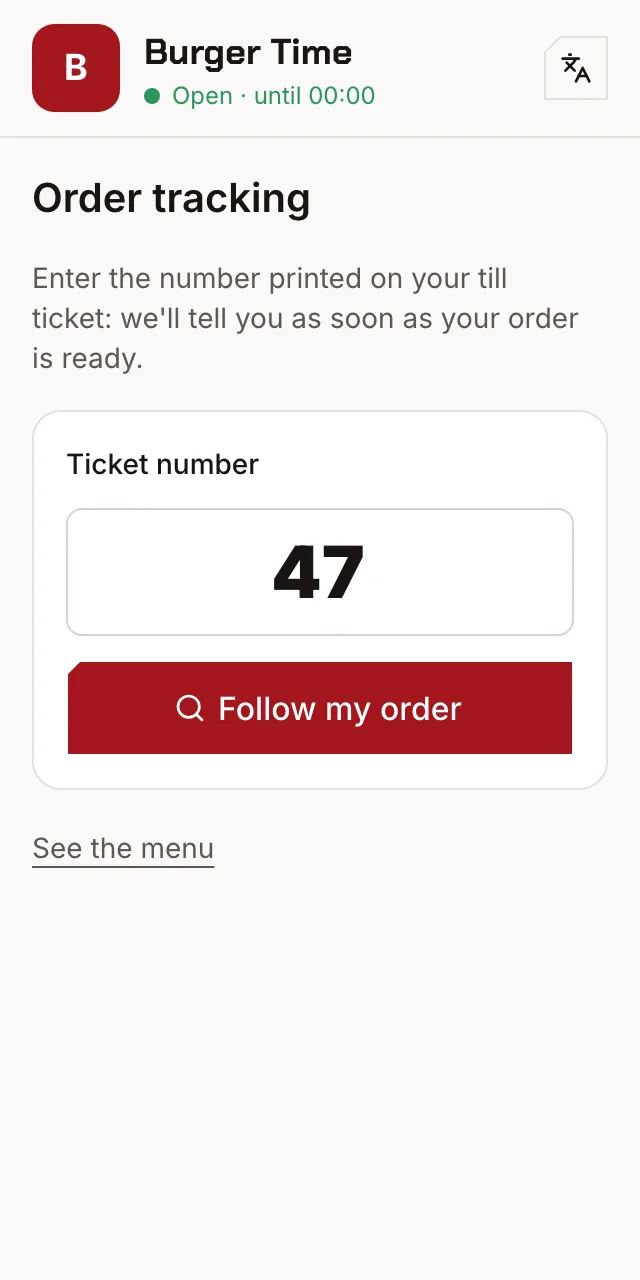
No need to change your till or type every order twice. Your cashier keeps using your usual till, which prints the ticket. At the bar, someone types only the ticket's number on a tablet: it shows as "Preparing" on the screen, and the guest follows it on their phone.
Nothing to install on your till, no technician: it works with any brand
At the bar, just type the ticket's number, a few seconds
The guest scans the screen's QR code, enters their number, and their phone rings when it's ready
Your sales stay in your till: Erashma doesn't count them a second time
42
Ready: the guest is called
The bar taps "Ready": the guest's phone gets a notification, and the open page shows "Order 42 is ready" in large letters, with sound and vibration. Guests can wait seated, on the terrace or outside: no more watching the screen or asking at the counter.
A reminder if the order isn't picked up after 5 minutes
A "Call again" button to call once more
384041
363742
A screen for guests without a phone
A TV or tablet above the bar shows the numbers being prepared and the ones ready, readable from afar. A new number flashes, with a sound.
~ 8 min
How long do guests wait?
Waiting time, pickup time and forgotten orders, month by month, in the insights.
Frequently asked questions
Do I need to buy pagers or hardware?
No. The guest's phone is the pager. For the screen, a TV or tablet you already have is enough, and it is optional.
Does the guest need to install an app?
No. They scan the QR code and everything happens in their phone's browser.
Does the guest have to stay in front of the screen?
No. Whether they ordered by QR or at the till (by scanning the tracking QR), their phone tells them when it's ready: they can sit down or step out. The screen is there for guests without a phone.
What if the guest has no phone?
They order at the counter and keep their number: they see it turn to "Ready" on the screen.
I already have a till with a screen and my menu. Do I have to change it?
No. Keep your till to take payments and print tickets. Erashma only adds the calling: at the bar, someone types the ticket's number, and the guest is told on their phone and on the screen.
Do I have to type every order again in Erashma?
No. Only the ticket's number is typed, not the items or the price. You just need a tablet or a phone at the bar, and a TV if you want the screen.
Can I get it without the rest of Erashma?
Yes. The order pager is an option on the Starter plan, which already includes the QR menu. The option's price is on the pricing page.
We'd like to measure the site's audience with Google Analytics (measurement cookies). Nothing is sent to Google without your consent, and you can change your mind at any time at the bottom of the page.